
Switching from a Squarespace to Shopify integration
Switching your Candid store integration from Squarespace to Shopify is something our support team can help you do. The process can take a few days to complete but once it's done you will be able to return to business operations as normal with minimal interruptions.
Here's how switching integrations works:
- First, we disconnect your Squarespace integration so that nothing is synced between Squarespace and Candid.
- Your products will stay in Candid but they will no longer be managed in Squarespace. Moving forward, your former Squarespace-synced products can be managed and edited directly from within Candid.
- Next, you will need to decide if you want to keep your former Squarespace products active in Candid or if you prefer to archive them.
- If you have the exact same products in Shopify we generally recommend archiving your Squarespace / Candid products so that you don't run into any duplicate product issues.
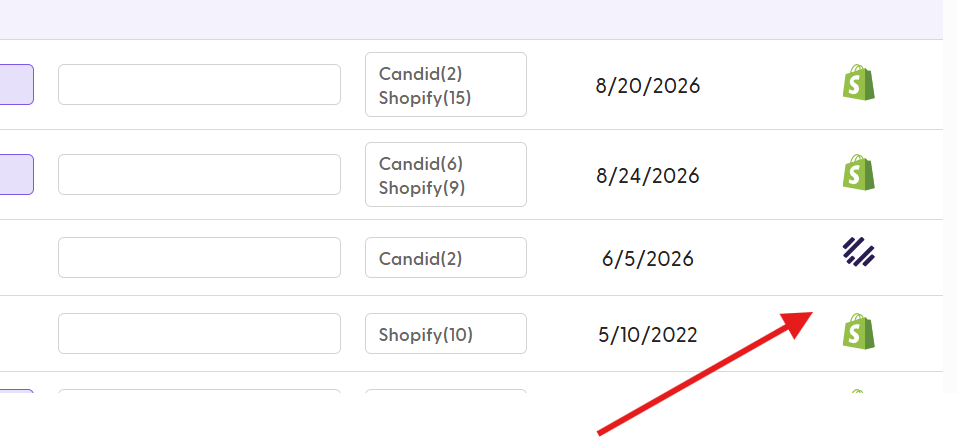
- If the products in your Shopify store are new or different from your Squarespace products, you can safely keep both sets of products active. If you choose to keep both you will be able to tell them apart based on the icon shown next to them on your products page (see image below):
- Once you have decided how you want to manage your former Squarespace products, we can proceed with syncing your Shopify store to Candid.
- After your Shopify products are synced, the next step will be to add your wholesale pricing to those newly synced products. You can learn more about this here: How to set up wholesale pricing
- The next and final step will be to publish your new products to your wholesale catalog(s) in Candid. You can learn more about this here: How to publish products to your wholesale catalog
Frequently asked questions about changing integrations:
Q: Why can't I just replace the same products with the new integration?
A: Our system reads the newly integrated Shopify products as a completely new products in Candid, even if the SKU, name, image, etc. is exactly the same as your Squarespace products.
Q: How long will it take my Shopify products to sync over?
A: This mostly depends on how many products you have and current site traffic, but usually product data from Shopify will sync over to Candid in under an hour. If you have a lot of products and images it can take a little longer but generally no longer than a few hours.
Q: What will happen to my reporting and sales data?
A: When you change integrations there will be a break in your reporting history, with sales data for Squarespace products stopping at the moment of changeover and the Shopify products starting from zero.
Q: What happens if my customers try to duplicate an old order with archived products?
A: If a customer attempts to reorder by duplicating a past order, the selected products might break in the new order and show as out of stock. If this happens you can edit the order on the buyer's behalf and replace the old products with new ones.
Q: How long does the process take to change integrations?
A: The whole process can vary depending on your unique situation, but it usually takes around 3-5 days. This includes the time it takes to update your wholesale pricing and publish the new products to your Candid catalog(s).
Q: Will this be disruptive to my sales?
A: Changing integrations takes some time to set up properly, so we definitely recommend choosing a time to make the switch when your business is relatively slow. Our support team will be working with you the whole time to make sure this process is as seamless as possible and help minimize any disruptions to your business.